Font Scaling
By default, Delphi FMX mobile applications use a font size of 12. When your application starts, FMX applies the system font scale to text using this default size. Other font sizes, however, are not automatically scaled in the same way, so you need to scale them programmatically.
I typically use an initialization method on my Frames to handle this. For example:
frame.lblText.Font.Size     := Fonts.Sub1;
frame.lblQuestion.Font.Size := Fonts.Sub2;
Remember to remove Size from StyledSettings; otherwise, the font size may be inherited from the style:
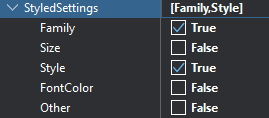
You can also do this programmatically:
lblQuestion.StyledSettings := lblQuestion.StyledSettings - [TStyledSetting.Size];The Fonts unit looks like this:
public
    property H1:       single read fH1;       // 96
    property H2:       single read fH2;       // 60
    property H3:       single read fH3;       // 48
    property H4:       single read fH4;       // 34
    property H5:       single read fH5;       // 24
    property H6:       single read fH6;       // 20
    property Sub1:     single read fSub1;     // 16
    property Sub2:     single read fSub2;     // 14
    property Body1:    single read fBody1;    // 16
    property Body2:    single read fBody2;    // 14
    property Caption:  single read fCaption;  // 12 - Normal
    property Overline: single read fOverline; // 10
    property Scale:    single read fScale;
The sizes below are based on the Material Design typography scale, which gives the application a consistent hierarchy from display headings through body text and overlines:
class constructor TFontUtil.Create;
begin
    fInstance := TFontUtil.Create;

    var fs := FmxScreen.FontScale;

    fInstance.fScale    := fs;
    fInstance.fH1       := 96.0 * fs;
    fInstance.fH2       := 60.0 * fs;
    fInstance.fH3       := 48.0 * fs;
    fInstance.fH4       := 34.0 * fs;
    fInstance.fH5       := 24.0 * fs;
    fInstance.fH6       := 20.0 * fs;
    fInstance.fSub1     := 16.0 * fs;
    fInstance.fSub2     := 14.0 * fs;
    fInstance.fBody1    := 16.0 * fs;
    fInstance.fBody2    := 14.0 * fs;
    fInstance.fCaption  := 12.0 * fs;
    fInstance.fOverline := 10.0 * fs;
end;
And here is the code used to obtain the system font scaling setting:
procedure TScreenUtil.InitFontScale;
begin
    fFontScale := 1.0;

{$IFDEF ANDROID}
    if TAndroidHelper.Context = nil then exit;

    var resources := TAndroidHelper.Context.getResources;
    if resources = nil then exit;

    var configuration := resources.getConfiguration;

    if configuration <> nil then
        fFontScale := configuration.fontScale;
{$ENDIF}

{$IFDEF IOS}
    var f := TUIFontDescriptor
                .OCClass
                .preferredFontDescriptorWithTextStyle(UIFontTextStyleBody);

    fFontScale := f.pointSize / 17.0;
{$ENDIF}
end;
One thing I love about Delphi is that it's multi-paradigm; it doesn't force you into an object-oriented framework. That makes it trivial to add a simple wrapper function like this:
function Fonts: TFontUtil;
begin
    Result := TFontUtil.fInstance;
end;