Windows Font Scaling
Delphi FMX applications on Windows use device-independent pixels (DIPs) when rendering fonts through DirectWrite. This means normal Windows DPI and display scaling do not require you to manually scale the font sizes specified in your application.
Windows also provides a separate accessibility setting that allows the user to increase the size of text without scaling the entire display. If your application uses its own font sizes, you can read this system text scale and apply it to your typography programmatically.
I like to maintain consistent font proportions across the application. The operating system determines the user's preferred text scale, while the application maintains the typography hierarchy. I typically use an initialization method on my Frames to handle this. For example:
frame.lblText.Font.Size     := Fonts.Sub1;
frame.lblQuestion.Font.Size := Fonts.Sub2;
Remember to remove Size from StyledSettings; otherwise, the font size may be inherited from the style:
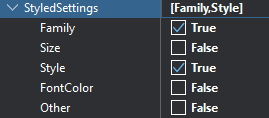
You can also do this programmatically:
lblQuestion.StyledSettings := lblQuestion.StyledSettings - [TStyledSetting.Size];The following font sizes are based on the Material Design 2 typography scale and give the application a consistent hierarchy from headings through body text and captions:
public
    property H1:       single read fH1;       // 96
    property H2:       single read fH2;       // 60
    property H3:       single read fH3;       // 48
    property H4:       single read fH4;       // 34
    property H5:       single read fH5;       // 24
    property H6:       single read fH6;       // 20
    property Sub1:     single read fSub1;     // 16
    property Sub2:     single read fSub2;     // 14
    property Body1:    single read fBody1;    // 16
    property Body2:    single read fBody2;    // 14
    property Caption:  single read fCaption;  // 12
    property Overline: single read fOverline; // 10
    property Scale:    single read fScale;
The font sizes are calculated from the Windows text scale as follows:
class constructor TFontUtil.Create;
begin
    fInstance := TFontUtil.Create;

    var fs := FmxScreen.FontScale;

    fInstance.fScale    := fs;
    fInstance.fH1       := 96.0 * fs;
    fInstance.fH2       := 60.0 * fs;
    fInstance.fH3       := 48.0 * fs;
    fInstance.fH4       := 34.0 * fs;
    fInstance.fH5       := 24.0 * fs;
    fInstance.fH6       := 20.0 * fs;
    fInstance.fSub1     := 16.0 * fs;
    fInstance.fSub2     := 14.0 * fs;
    fInstance.fBody1    := 16.0 * fs;
    fInstance.fBody2    := 14.0 * fs;
    fInstance.fCaption  := 12.0 * fs;
    fInstance.fOverline := 10.0 * fs;
end;
Windows stores the user's text accessibility scale separately from normal display scaling.
It supports a text scale from 100% to 225%. For example, a Windows text scale of 125% results in a font scale of 1.25, while 150% produces a scale of 1.50.
We can read this value and convert it into the same scale factor used by the Fonts utility.
Windows exposes this setting through the UISettings.TextScaleFactor API. I've used the registry value here because it provides a simple Win32 implementation without introducing additional WinRT dependencies. The registry stores the percentage as an integer, so a value of 125 is converted to a scale factor of 1.25.
procedure TScreenUtil.InitFontScale;
begin
    fFontScale := 1.0;

{$IFDEF MSWINDOWS}
    var Reg := TRegistry.Create(KEY_READ);
    try
        Reg.RootKey := HKEY_CURRENT_USER;

        if Reg.OpenKeyReadOnly('Software\Microsoft\Accessibility') then
            if Reg.ValueExists('TextScaleFactor') then
                fFontScale := Reg.ReadInteger('TextScaleFactor') / 100.0;
    finally
        Reg.Free;
    end;
{$ENDIF}
end;
The Windows implementation requires the following units:
{$IFDEF MSWINDOWS}
uses
    System.Win.Registry,
    Winapi.Windows;
{$ENDIF}
This is different from Windows display or DPI scaling. FireMonkey already works with device-independent units on Windows, so the purpose of this code is specifically to respect the user's accessibility text-size preference rather than compensate for monitor DPI.
Windows does not necessarily apply its text scale uniformly to every native font size; larger text is generally affected less than smaller text. For this utility, I deliberately use a uniform scale because it preserves the application's typography ratios and keeps the hierarchy predictable and consistent. You can, of course, adjust the individual heading scales if you prefer behaviour closer to native Windows typography.
One thing I love about Delphi is that it's multi-paradigm; it doesn't force you into an object-oriented framework. That makes it trivial to add a simple wrapper function like this:
function Fonts: TFontUtil;
begin
    Result := TFontUtil.fInstance;
end;